

 |  |  |
Showing posts with label Home. Show all posts
Showing posts with label Home. Show all posts
Format table is one of the most important feature in excel

Include data bar in Excel Data to Quickly review the strength individually.
 |
| Add caption |
Complete understanding for Top & Bottom Rules in Excel

If you are a manager of Sales team you will must understand that how would Quickly track achieved target of you sales team in any specific period,
Top / Bottom Rules by Conditional formatting Excel provides the best and accurate results of sales increase & decrease , identifying top & bottom sales executives records , instant tracking highest & lowest sales , quickly awareness of above & below averages for the selected months or years.
Top / Bottom rules Step by Step :
 |
| Top 10 & Top10% in Top/Bottom Rules in Excel Conditional Formatting |
Top 10 Items : Identifying top figures as by your request.( maybe more/less then 10 )
Top 10% Items: Identifying top figures in percentage as by your request.( maybe more/less then 10% )
 |
| Top 10 & Top10% in Top/Bottom Rules in Excel Conditional Formatting |
Bottom 10 Items : identifying from bottom lower values it may be more / less by 10.
Bottom 10% Items : Track lower percentages in selected range it maybe more/less 10%.
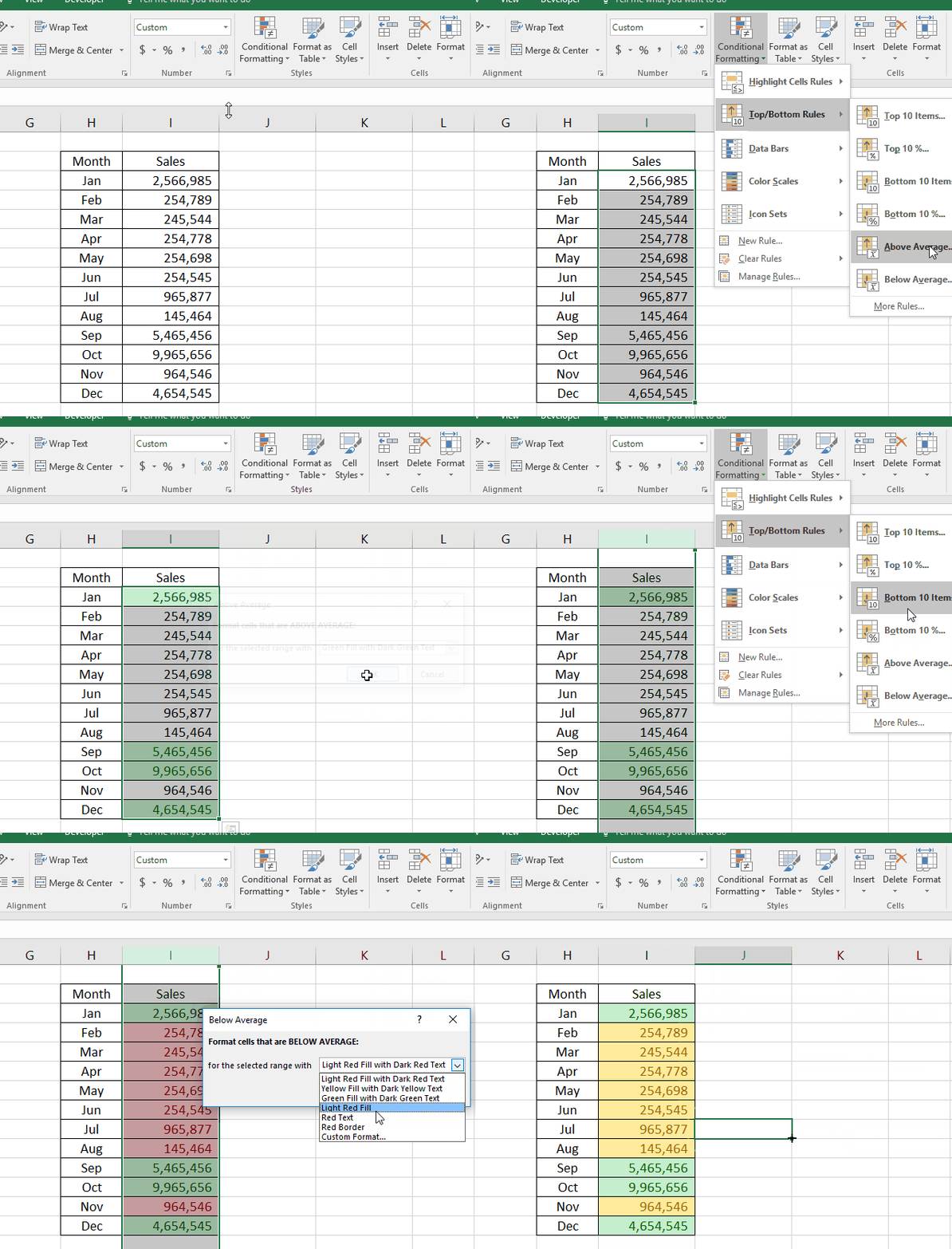 |
| Above & Below Averages : Top/Bottom Rules in Excel Conditional Formatting |
Above & Below Average : this highlighted , what values are above and below averages between the selected cells.
Work with Number section in Excel
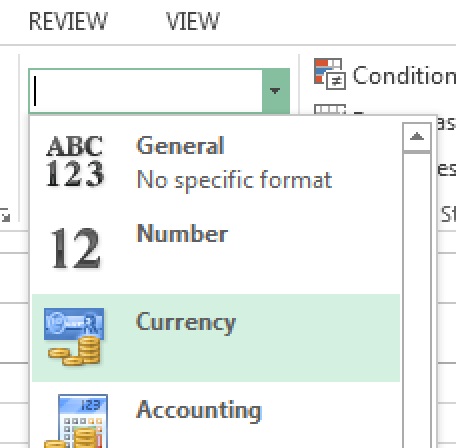
General : You can write anything inform of numbers or alphabetical characters in General there is no specific format apply.
Number : change your cell value in decimals in ending , you can also set thousand separator coma, and Negative numbers.
Currency : Allows you to show Currency Symbol if any you may also add more symbols from windows time and Regional settings.
Accounts : Line up the currency symbols and decimal points in a column.
Date : Different kinds of date Format you can set as your own wish and this will automatically appeared in the current year while you just wrote date , and month even it was a long format no worried you can easily set this in your sheet.
Time : Set format like 12 hours or 24 hours , am , pm hours , min , seconds etc.
Percentage : its Multiply the cell value by 100 and showing a symbol of % .
Text : Helps to remove any kind of number formatting just showing a simple text as you write and as you wish.
All About Alignment in Excel

Also we have learn how to increase , decrease indent of content , text orientation , Wrap Text & Merge & Center , try to cover additional alignment in which you will learn in detail .
All Types of Alignment :

Short-Key Top Align alt+h+a+t
Short-Key middle Align alt+h+a+m
Middle align : shifted text to the centered , in the middle of top and bottom of the cell.
Short-Key bottom Align alt+h+a+b
Bottom Align : Cell value at the bottom bottom.
Short-Key right Align alt+h+a+r
Right Align : shifted value to right corner.
Short-Key center Align alt+h+a+c
Center : Centered the text.
Short-Key left Align alt+h+a+l
Align Left : Align content to the left.
Wrap Text.

Short-Key wrap text ctrl+shift+w
Force the cell content to remain in the same cell is know as WRAP TEXT.
Work with Merging.
Short-Key merge & center : alt + h+m+c.
To combining and Centered Cells content in new large cell known as Merge & Center.
Merge Across
Short-Key merge & Across : alt + h+m+a.
Selection of Cells into one row in a large cell shape.
Merge Cells
Short-Key merge Cells: alt + h+m+m.
Selection of cells merge into one large cell.
unMerge Cells.
Short-Key of Unmerge Cells : alt + h+m+u.
Split selected merged cell into multiple cells or say this remove the merge activity of any area.
Examples are :
 |
| alignment in Excel |
How to Copy and Paste in Excel 2013

Today we will talk about Cut , Copy and Paste within excel workbook , for this you have to take some very simple steps, also gives you an Idea to do this by using short-key by using keyboard on the right top corner on excel there is a section name CLIPBOARD , inside clipboard you will saw CUT , COPY , FORMAT PAINTER and PASTE you will learn each individually.
Cut and Paste in Excel.
Short-key : Ctrl + X than Ctrl + V

Note : Remember always use PASTE as a value if you saw a drop down in paste icon because we just learning here only copy , cut and paste command.
Copy and Paste in Excel.
Short-key : Ctrl + C than Ctrl + V

Make duplicate a piece of data from a cell or combination of cell to other location but this time the original data remain on the same place , pasting remain the same by using Ctrl + V , Excel 2013 there is a feature includes paste as a picture you can paste the copied data in the shape of picture try both thing at excel sheet you will understand easily.
Format Painter
Short-key : Ctrl + C than Alt+E, S, T, hit Enter

This will only copying the formatting of selected cells and paste to other location ,its very simple through this you will save so much of your time to waste to create formatting again and again , including borders of cells colors of fonts size and many other things include the source formatting , it does not effect to the value of cell or any formula if present already.
Clipboard its self a temporary storage of your copied or cut items which will available to paste other location easily .
See the below picture for use of clipboard.

Introduction and benefits of Microsoft Excel


What is Microsoft Excel and what are the basic features.
Microsoft Excel is part of Microsoft Office Suits , this was early released in several version , latest MS Excel known as Office 16. features includes Power Query integration , New Chart Types, Excel forecasting functions, Excel data cards and many more.
Quick Review of Excel benefits and outputs.
- Users able to organize , format and calculate data in minimum time.
- Can create graphical representation.
- analyzed data very quickly and easily.
- summarized records simply.
- reconciled data with other sheets.
How Microsoft Excel helps in Profession.
Microsoft Excel is almost the need of every industry around the globe tracking records , analyzing data , helps allot to concise your spreadsheet work , Generating Reports from gigantic data , filtering the part of mega records , also you will become a free lancer after get expertise in MS Excel.
Understanding each and every thing.
I try my level best to gives you maximum descriptive information with the help of video tutorial and via images. also , I design my blog like an Excel Work Book that gives you resemblance of Excel Workbook.
What we learn at this platform.
Key Information about Excel Workbook , work with excel formulas , how to get rid day to day excel Queries , header Ribbon Customization as desired , provides detail video tutorials for Excel in Urdu , Hindi & English , response to your queries and happy to solve them this will be useful for me as well this increase my knowledge also.
Sharing is Caring.
don't hesitate to share this with someone else maybe they need this and if your relatives , friends children requires in academic point of view , professional aspects , your friends might think to learn ms office but unable to afford , the information on this blog is absolutely free not any single penny will charge.
Subscribe to:
Posts (Atom)